Generate & Publish QR Codes
Customized Mobile Pages
Track QR Codes
Choose Color & Shape
Add Logos to QR Codes
Benefits from QRAllow
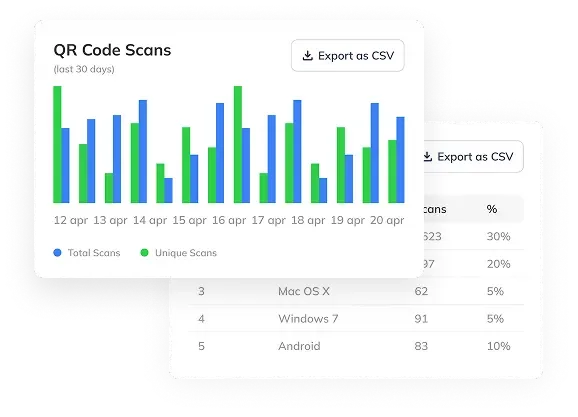
By using QRAllow you will be able to keep track of how many people scan your QR Codes, from where and on what date.
Also, for non-developers, you can create fully customized landing pages for your QR Codes. No coding required!
- Dynamic QR Codes
- Static QR Codes
- QR Code Statistics
- Fully customized landing pages
- Customized colors & shapes for QR Codes
- No coding required
Dynamic vs Static QR Codes
The outcome of both are pretty similar. They have their differences when it comes to changes, updates, stats, track.
Dynamic QR Codes
This QR Code type is most used by business owners (restaurants, gyms, clothing stores, etc.), artists, influencers,and non-developers users.
Static QR Codes
Static QR Codes on the other hand can't be changed or
updated once created and went public.
How to Use
Create an account and use our QR Code Generator to create unlimited dynamic & static QR Codes.
- 1
Choose QR Code Type
First step would be to choose your QR Code Type. This will define what your QR Code will do.
- 2
Fill required fields
Then, you'll need to fill the required fields that the QR Code type is asking. For example, Type 'Link' will ask for a website URL.
- 3
Download & Share QR Code
Finally, you can download and share your QR Code Generated from your dashboard and edit if needed.
What are QR Codes?
They were created in 1994 by Denso Wave to track vehicles during manufacturing. They quickly gained popularity when it spread to smartphones. You can now even scan QR Codes from your phone camera.
Gather Feedback
You can ask users to give some feedback when they scan the QR Code.
Profile Cards
Physical profile cards are every day more rare and digital profile cards are a great alternative.
Describe your Business
You can redirect your clients to some instruction page for your business when they scan the QR Code.
Promote Events & Discounts
You can promote any event or give discount codes when people scan the QR Code.
QR Code Types
Different QR Code types you can use for Static and Dynamic QR Codes.
Link
Link to any website URL
Send an email
Text
Share text
Call
Make a call
SMS
Send a message
Send WhatsApp message
Wi-Fi
Connect to Wi-Fi
V-Card
Save a contact to the phone scanning
PayPal
Generate a PayPal transaction
Event
Promote any event
Share PDF document
App
Download apps for Android & iOS
Images
Share multiple images
Video
Share a video
Social Media
A tree for all your socials